A happy, healthy and prosperous new year to all of you! I know, I am a little late to the party, but nevertheless I hope all of you have had a good start into the new year and are doing well.
Last year felt like it passed quite quickly. I had been constantly busy with one thing or another and most of my time, especially in the first half of the year, had been taken by my day job. A company restructuring with many layoffs and extensive organisational changes gave me a truckload of work.
What followed was an extraordinary warm summer, during which I was mostly slacking and fooling around with some personal projects.
Starting in late summer, I began a complete overhaul of our company’s IT documentation, mainly to adjust it to the changes that happend in the first half of the year. But as it turned out, it also needed a lot of general updating and in the end it became a project that kept me busy for almost the rest of the year (rewritten from scratch, the resulting book currently has over 300 pages).
Apart from that, my main interests (and what I have spent most time on) had been brushing up my knowledge of ARM assembly, bare metal programming of the Raspberry Pi and other low-level programming stuff, like operating system design in general.
Now, for 2024 I (maybe just like anybody else) have made myself some resolutions and set some personal goals. But, as always, let’s wait and see what becomes of it… 😀
That’s the title of this article on Computerworld, giving some interesting insight on Microsoft’s plans to bring desktop computing to the cloud and strip businesses of the classical PC desktop.
While I wouldn’t go so far to predict an early death of Windows as a desktop operating system, the article makes clear what we are heading for. At least in the business world.
In my job as system administrator I can witness first hand how Microsoft is aggressively moving services to the cloud. They are targeting every aspect of business computing (because, that’s where the money is) and providing a Windows desktop as a cloud service is just another piece in their grand picture.
Whether that’s good or bad? You decide for yourself… I could tell some stories.
Funnily, “Desktop as a service”, or DaaS for short, has been around for a very long time. I remember using Triton Technologies “CoSession” back in the days of the venerable DOS and Citrix Metaframe later on in the good old days of Windows NT.
Yet again it’s Microsoft that tries to sell you old wine in new bottles 😀
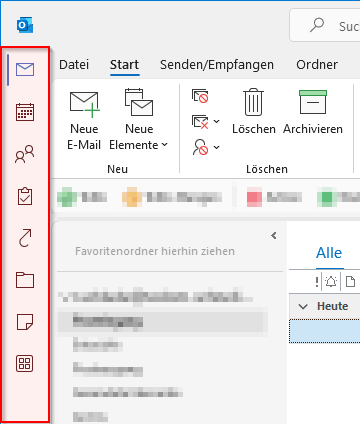
One of the most hated “features” that Microsoft has recently forced upon Outlook M365 users is the new “Apps” sidebar on the left side of Outlook’s main window.
The much hated Outlook sidebar
This nonsense takes up valuable screen estate on smaller laptop screens and many users, including myself, prefer the “old” layout where the folder icons are placed below the list of folder.
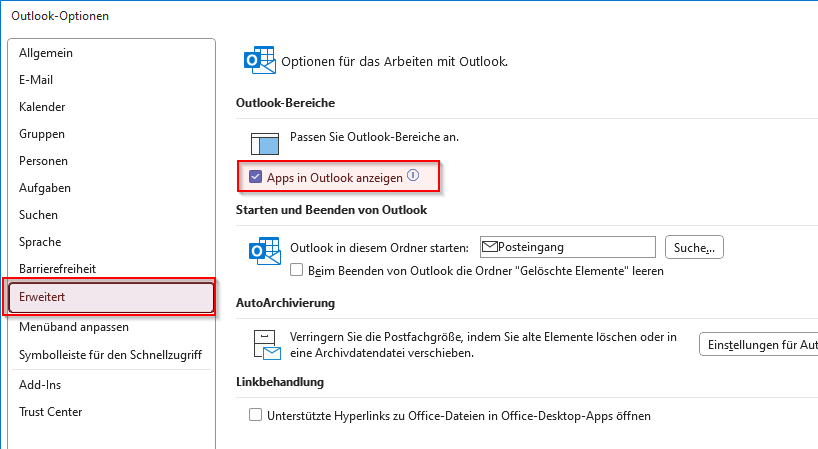
Well, luckily, at least for now, there is a way to get the old layout back by turning the option “Show Apps in Outlook” off.
Open the “File” menu and select “Options”, then goto the “Advanced” section. There uncheck the option “Show Apps in Outlook” and press “OK”
At the company I work for, we use Microsoft Teams for video calls, conferencing and collaborative work. Leaving its doubious technical aspects aside, the tool mostly works for our colleagues and its usage is pretty straightforward.
Nevertheless, not all of our employees are tech-savvy and used to this kind of communication, especially some of the older workers. And so I get frequently asked for some kind of introductory material which helps them getting started with Microsoft Teams.
Luckily, Microsoft itself has some helpful resources and training materials for Microsoft Teams available on their website, which, as it seems, are sometimes overlooked.
Here’s a list of the most interesting parts for new users (links to German versions), which I forward to new colleagues and those asking for help:
Happy New Year to everyone! I wish you all a prosperous and healthy new year 2022 and hope you have had a great start 😊.
2021 is gone, the second year of the global Corona virus pandemic which, again, has imposed a lot of retrenchments on all of us. I sincerely hope that the year ahead will be better, especially in this regard.
Nevertheless, last year has been a busy one with no time to mope. In my spare time I was mainly busy doing renovation work in our home (which is still ongoing) while my day job has become increasingly demanding lately (mostly because of major structural changes in IT and a “mobile workforce” that needs a lot of support). All in all I had almost no time to spend on my hobbies or personal projects. Naturally, one of my new years resolutions is to find back to a more normal schedule.
That being said, I would also like to pick up some of the projects I had abandoned last year and also start some new ones. With my current unstable schedule we will see how far I get… but, resolutions, you know…
Again, I wish you all the best for the new year and as always: MUNTER BLEIBEN!
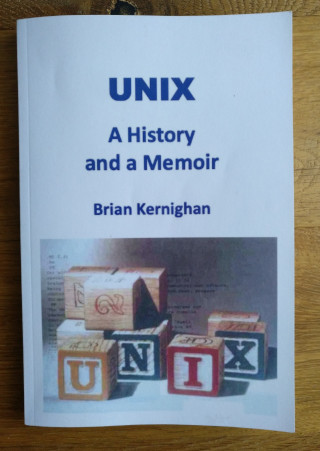
I recently finished reading the book “UNIX - A History and a Memoir” by Brian Kernighan which was a great read, especially for someone who is into the UNIX operating system as much as I am.
On about 180 pages the book tells the story how UNIX came about and how its groundbreaking concepts changed the path of computer technology and led to a whole lot of new and innovative software, which still is in use over 50 years later.
What I particularly liked about the book is not only the intelligible and entertaining style it is written in, but especially that the events are portrayed first-hand by Brian, who had been closely working with the Unix creators Ken Thompson and Dennis Ritchie at the time when Unix was created at Computing Science Research Center at Bell Labs.
It was especially interesting to learn, how the particulars, the exactly fitting mix of people and work environment, time and events led to something far beyond what the creators could have imagined.
If you are interested in computing or computing history, or in Unix specifically, this book is for you.
The Book
At the end of the book Brian had referenced a couple of web links I almost was too lazy to type in. But I did it anyway and it led to some interesting resources on the topic. Mainly for my own reference, I’ve listed some of them below. Be aware that this is by no means the complete list of references Brian had mentioned. There are a whole lot more, especially to papers and books.
Recently, the battery of my trusty old Samsung Galaxy Tab 2 (GT-P5100) has become weaker and charging cycles took longer. Buy a new tablet? Of course not! If you check your favorite video platform, you will find plenty of videos, showing you how easy it is to replace the internal battery. So let's go ahead...
Happy new year everybody! I hope everyone has had a good start into the new year. Now that we have once again crossed the magical border between years, it is time for a short personal recap of 2018...
From my experience, using the traditional way of bookmarking in multiple browsers ends in a complete mess. I've spent countless hours in getting my bookmarks in sync between my computers at home, at work and elsewhere and all the different browsers I use. The more my list of bookmarks grew, the more tedious the process of synchronization got.
But, as for most issues, there are several ways to solve it.
First, you may use one of the countless online services or social bookmarking sites such as delicious.com or diigo to get your bookmarks organized. While some of them have great features and functions to share bookmarks (if this is your intention), I never trusted them. It's far to easy to create a nice profile of you and your interests, just by analyzing your bookmarks and how often you click them. Now, call me paranoid, but I bet that's what most of these free services are doing in order to sell data to market research companies and the like. Anyways, if you don't care about this, I'd recommend having a look at delicious.com or Google Bookmarks.
Another way to get your bookmark stuff organized and synchronized between browsers is the use of tools, made for this specific task. In an quite old article 25+ Ways To Synchronize Your Bookmarks over at mashable.com you'll find many of them listed and explained.
And lately the maker of browser have begun to integrate synchronization support directly into their browsers, for example Firefox Sync or Google Sync Services functionality in Google Chrome, which is great if you're using the same browser everywhere.
Personally I have chosen another tool to organize my bookmarks. Since I am running my own website with database support, I am in the fortunate position to host my own online bookmarking services. In my case I'm using the not so well known tool Online-Bookmarks, which is quite excellent for this task.
Unfortunately development of "Online-Bookmarks" has been put on ice a while ago. Nevertheless, all the functionality you expect from such a tool (except for tagging) is available and works flawlessly. And if you, like me, are used to work with an hierarchical organization of your bookmarks (i.e. keeping them in folders and subfolders) rather than tagging them, there's nothing you'll be missing.
So, if you have the necessary prerequisites and want to keep your bookmarks private, yet not giving up the advantages of an online bookmark service, you should check it out. And if you like it, drop the author an email to let him know. Maybe it encourages him to continue development on this nice project.
And just in case you wonder: I've currently 2228 bookmarks in my database :-)
Lately I prepared a bunch of spreadsheets in Open Office that contained lists of calendar data and values. I had a template file that already contained the basic layout which I just needed to fill in. So I typed, copied, typed, and so on until I was finished after almost three hours of work.
After saving the document and re-open it on my notebook (another installation of Open Office), I found my whole list of dates displayed with different years – they had gone four years into the past. At first I thought I made a mistake, corrected the dates, saved the document and re-opened it on my desktop computer. Yet again I found the dates shifted. I corrected the dates again, saved and re-opened it and annoyingly they were shifted again.
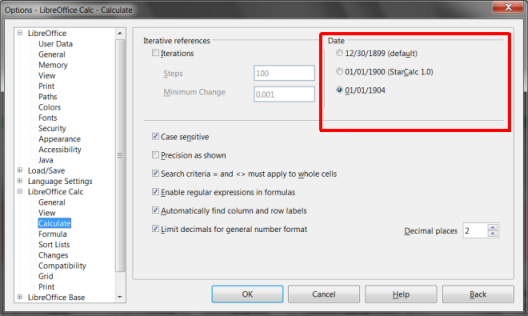
After a while I figured out that the reason for this behavior was due to different settings of the base date in Open Office.
Open Office base date settings
where one installation was set to to the default of "30/12/1899", the other one to "01/01/1904". Normally I would have expected that the base date settings are stored in the spreadsheet document, but for some reason this is not the case.
After settings both installations to the same base date, the problem was solved. Simple, if you know where to look. In the end it had cost me quite some time to figure this out.
I'm available to help on your open source project. If you think my skillset below matches your requirements, feel free to contact me. I don't have any special preferences regarding the size or kind of your project, but preferably it should be of interest to a broader audience or address real world problems. Also, your time schedule should be somewhat flexible.
I can provide:
Programming: C/C++, Python, Perl, SQL & database design, et al.
I've to admit that I've shamelessly neglected my blog lately. Here's a short roll-up on what happened lately...
In my last post from June I already wrote about the many fill-ins I had to make at work lately. Unfortunately this hasn't changed. After a substitution for another colleague right before my vacation in September, I was recently informed that I have to step in again for a total of 9 weeks! In fact I'm already starting week two of this substitution.
The problem is that all tasks in the jobs I'm currently stepping in are crucial for the company's operation and require full attention. At the same time I have to keep the IT running and to provide a basic level of support to our users. All in all it is totaling up to an enormous workload, not leaving much room for other activities. And my blog is one of the things that suffer from this situation.
I'll try to re-arrange my schedule during the next days and maybe I can spare some time to write a more comprehensive update on my other activities.
Yet again I got into the situation to fill in for a colleague who had to undergo a surgery. Yet again it means that I've to handle double the workload and yet again I feel I'm totally out of time. Although I try not to spend too much time at the office and to get out of there as close to the stroke as I can, the situation is so demanding that I'm pretty tired after work and I hardly can motivate myself to do something else than just to goof off. I don't know for how long I'll have to fill in this time, but I guess it will be a couple of weeks (depending on how fast my colleague recovers).
After looking on my recording of time worked since the beginning of 2010, I have the feeling that all these substitutions become rampant. But wailing won't help, I guess. So let's get through and hope that it won't last too long. At least my upcoming vacation in July is a ray of hope :-)
Today is Corpus Christi, a religious feast, so we didn’t work here in South Germany. But since the weather was pretty bad (cold and rainy), I spent my day at the computer, upgrading my Cygwin environment and reworking content of my personal wiki knowledge base (which is badly in need to be uncluttered).
It’s Valentine’s Day, but since I’m not into this kind of stuff, I spent my time today on updating my site to the latest Habari release. The update process went smoothly and there weren’t adaptations to make. However, while I had a closer look after the upgrade, I found a few issues in my site’s theme and fixed a bunch of glitches in the comment system, the template class functions and few minor things in the main CSS set. Everything should run fine now.
Yesterday I made as small excursion to the Drupal CMS, just out of curiosity. I haven’t looked at it for a few years now, although I constantly run into it, as many high traffic sites such as java.net use it as their publishing platform. To get a grip on it, I ported my current site template to Drupal. Basically it isn’t very hard to create a template, although I had to apply a few tricks to make my template work the way I wanted it. Once Drupal's concept is understood, it’s pretty straightforward to use it. In order to avoid fiddling with its internals, you might also make use of the vast amount of plugins and themes for Drupal. After all, I'm considering to use it for my next major web project. And before you ask: I have no intention to move away from Habari for my personal site.
Apart from fiddling with web related stuff this weekend, I also finished setting up a new home network at my parent’s house. Everything works fine, Mom and Dad are happy :-)
Finally, after almost 10 months of continuing work with no holiday, I’m going on vacation for a little more than a week. I will return on Friday next week. Until then, happy trails!
I have a bunch of PC systems around here but for the past two years or so I worked almost exclusively on my Dell notebook. I haven’t upgraded any of my desktop systems since. In fact, the last time I upgraded any of them must have been four years or even longer ago. But now, with the dawn of new, power-demanding video games like COD5 and others, I had to make a decision: Buy a new, powerful notebook or upgrade a desktop PC. I decided to do the latter…
I wish you all a very Happy New Year! Immer munter bleiben!
EDIT: A Youtube video that is no longer available had been placed here. It was removed.
Yes, I love those funny cat videos :-)
NB: Just in case anybody wonders: The song played in this video is “Auld Lang Syne”, a Scottish poem that dates back to 1788. The song is well known in many English-speaking countries and traditionally sung to celebrate the start of a new year.
Update 2009-01-04
While routinely checking my site for web standards compliance I learned that inserting Youtube videos with the standard code they provide breaks the validation. Stylehack as written an interesting article on this issue and how to get around it.