A happy, healthy and prosperous new year to all of you! I know, I am a little late to the party, but nevertheless I hope all of you have had a good start into the new year and are doing well.
Last year felt like it passed quite quickly. I had been constantly busy with one thing or another and most of my time, especially in the first half of the year, had been taken by my day job. A company restructuring with many layoffs and extensive organisational changes gave me a truckload of work.
What followed was an extraordinary warm summer, during which I was mostly slacking and fooling around with some personal projects.
Starting in late summer, I began a complete overhaul of our company’s IT documentation, mainly to adjust it to the changes that happend in the first half of the year. But as it turned out, it also needed a lot of general updating and in the end it became a project that kept me busy for almost the rest of the year (rewritten from scratch, the resulting book currently has over 300 pages).
Apart from that, my main interests (and what I have spent most time on) had been brushing up my knowledge of ARM assembly, bare metal programming of the Raspberry Pi and other low-level programming stuff, like operating system design in general.
Now, for 2024 I (maybe just like anybody else) have made myself some resolutions and set some personal goals. But, as always, let’s wait and see what becomes of it… 😀
That’s the title of this article on Computerworld, giving some interesting insight on Microsoft’s plans to bring desktop computing to the cloud and strip businesses of the classical PC desktop.
While I wouldn’t go so far to predict an early death of Windows as a desktop operating system, the article makes clear what we are heading for. At least in the business world.
In my job as system administrator I can witness first hand how Microsoft is aggressively moving services to the cloud. They are targeting every aspect of business computing (because, that’s where the money is) and providing a Windows desktop as a cloud service is just another piece in their grand picture.
Whether that’s good or bad? You decide for yourself… I could tell some stories.
Funnily, “Desktop as a service”, or DaaS for short, has been around for a very long time. I remember using Triton Technologies “CoSession” back in the days of the venerable DOS and Citrix Metaframe later on in the good old days of Windows NT.
Yet again it’s Microsoft that tries to sell you old wine in new bottles 😀
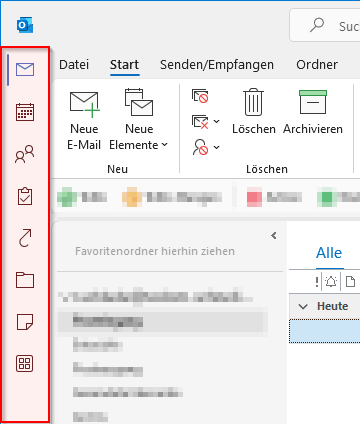
One of the most hated “features” that Microsoft has recently forced upon Outlook M365 users is the new “Apps” sidebar on the left side of Outlook’s main window.
The much hated Outlook sidebar
This nonsense takes up valuable screen estate on smaller laptop screens and many users, including myself, prefer the “old” layout where the folder icons are placed below the list of folder.
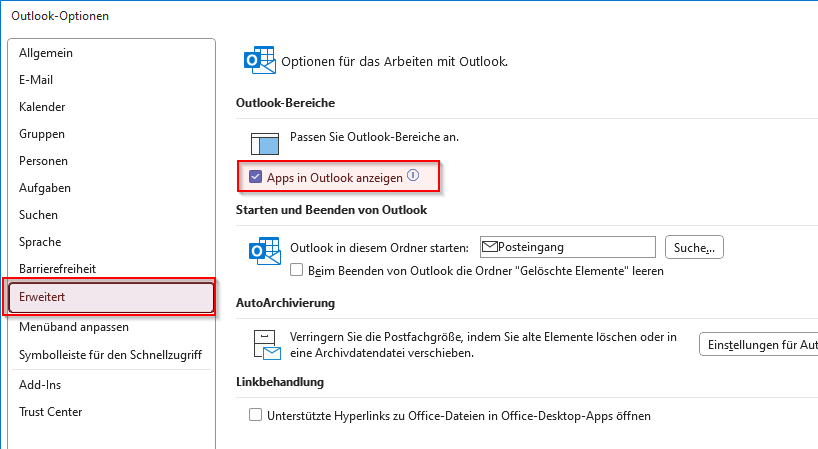
Well, luckily, at least for now, there is a way to get the old layout back by turning the option “Show Apps in Outlook” off.
Open the “File” menu and select “Options”, then goto the “Advanced” section. There uncheck the option “Show Apps in Outlook” and press “OK”
At the company I work for, we use Microsoft Teams for video calls, conferencing and collaborative work. Leaving its doubious technical aspects aside, the tool mostly works for our colleagues and its usage is pretty straightforward.
Nevertheless, not all of our employees are tech-savvy and used to this kind of communication, especially some of the older workers. And so I get frequently asked for some kind of introductory material which helps them getting started with Microsoft Teams.
Luckily, Microsoft itself has some helpful resources and training materials for Microsoft Teams available on their website, which, as it seems, are sometimes overlooked.
Here’s a list of the most interesting parts for new users (links to German versions), which I forward to new colleagues and those asking for help:
When I started using TMUX years ago, I frequently updated it from its Github repository, always eager to learn about the latest features of each new version. But, having become the lazy slacker I am nowadays and also having become quite comfortable with my current tmux setup, I haven’t done so for ages.
Today however, I finally did an upgrade to the latest git version and took the opportunity to fix my TMUX configuration regarding a (mildly annoying) shortcoming of not being able to copy mouse selection directly to the system clipboard.
I normaly use the keyboard to copy and paste from or to tmux (CTRL-B being my tmux prefix key):
CTRL-B + [ - to enter copy mode
v - to start a selection (or V to start line selection), using the VI h,j,k and l keys to move around
y - to yank the selected text to the system clipboard
CTRL-B + p - to paste
This behaviour is achieved by these configuraton options:
# Use vi keys for navigation set-window-option -g mode-keys vi # begin selection bind -T copy-mode-vi v send-keys -X begin-selection # copy to global clipboard bind -T copy-mode-vi y send-keys -X copy-pipe-and-cancel "xclip -i -f -selection prima # paste from global clipboard bind p run "tmux set-buffer \"$(xclip -o)\"; tmux paste-buffer"
One thing that had never worked for me however was, to copy an area of text from tmux directly to the system clipboard by using the mouse.
To be honest, this had not bothered me enough to put a lot of energy in finding a solution for it, because in my terminal of choice (xfce4-terminal) it is easily possible to just hold down the shift key when doing mouse selections and then shift-right-click to use the terminal’s native copy-paste functionality.
Nevertheless, with the new version of TMUX I finally found an easy solution by adding these settings to my configuration file:
It’s the same command as for copying by keyboard, except the keycode being ‘‘MouseDragEnd1Pane’’.
I actually don’t know for how long this solution has been around, but I’m glad I finally learned about it. My TMUX experience now seems to be complete :-)
And, since everybody seems to enjoy looking at other’s configuration settings, here’s my complete ‘’.tmux.conf’’ file:
# TERM set -g default-terminal "screen-256color" # Statusbar set-option -g status on set-option -g status-bg colour235 set-option -g status-fg colour244 set-option -g status-interval 2 set -g status-right '#[fg=green]#[bg=green]#[fg=black] #(hostname) %Y-%m-%d %H:%M #[fg=colour17]#[bg=colour17]#[fg=colour39] #(whoami) #[default]' # Highlight active window set-window-option -g window-status-current-style fg=white set-window-option -g window-status-current-style bg=colour235 set-option -g pane-border-style bg=colour235 set-option -g pane-border-style fg=yellow set-option -g pane-active-border-style fg=colour244 # key bindings set-window-option -g mode-keys vi bind h select-pane -L bind j select-pane -D bind k select-pane -U bind l select-pane -R bind r source-file ~/.tmux.conf \; display-message "Config reloaded..." bind v split-window -h bind b split-window -v bind-key C-b last-window bind C-v paste-buffer # begin selection bind -T copy-mode-vi v send-keys -X begin-selection # copy to global clipboard bind -T copy-mode-vi y send-keys -X copy-pipe-and-cancel "xclip -i -f -selection primary | xclip -i -selection clipboard >/dev/null" # paste from global clipboard bind p run "tmux set-buffer \"$(xclip -o)\"; tmux paste-buffer" # options set-window-option -g clock-mode-colour colour33 set-window-option -g aggressive-resize on # faster key repeat set -s escape-time 0 # Activity monitoring set-window-option -g monitor-activity on set -g visual-activity on # mouse support set-option -g mouse on bind -T copy-mode-vi MouseDragEnd1Pane send-keys -X copy-pipe-and-cancel "xclip -i -f -selection primary | xclip -i -selection clipboard >/dev/null" # scrollback set -g history-limit 128000 # tab numbering starts at 1 set -g base-index 1 # F1 bound to quickly create a multi pane layout for my development work bind F1 split-window -v -l 8 \; split-window -h -p 50 \; split-window -h -p 50 \; select-pane -t 0 \; split-window -h -p 50
You may have noticed those “special characters” in the status bar setup. These are actually some modified unicode characters coming from the font I use for my terminal, “LiterationMono Nerd Font”, which can be found here.